 PGari Glowee: Mac brightness with window spotlight
MacBook Pro brightness: reaching the nits the slider holds back
Short answer: The ceiling on MacBook Pro brightness is a software decision, not a hardware one. Apple's specifications for the 14-inch and 16-inch MacBook Pro list 1,000 nits sustained and 1,600 nits peak for HDR content, against only 500 nits for everything else on the 2021 and early-2023 models and 600 nits on the November 2023 models. Hold F2 until the slider will go no further and the panel is still running at roughly a third of its capability; the remainder is reserved for HDR video. PGari Glowee unlocks part of that reserve for ordinary work — a spreadsheet, a PDF, a code editor, a browser tab — at up to 1.5 times what the slider allows, over the whole screen or in just the window in front of you.
What follows is each way of raising brightness on a Mac, ordered by what to try first, with a plain account of which machines have room to spare and which have none.
First check that macOS is not holding the screen back
Most "my MacBook screen is too dim" complaints turn out to be settings. Work through these before you install anything.
- Use the brightness keys. F2 raises brightness and F1 lowers it. Apple's shortcut list adds a finer control: hold Option-Shift while pressing them to move in smaller steps. Option with Brightness Up opens Displays settings directly.
- Switch off automatic brightness. Go to System Settings → Displays and turn off Automatically adjust brightness. The ambient light sensor pulls the screen down as the light around you changes, which is exactly what you notice when a cloud passes or the afternoon sun swings round. Apple does note that turning auto-brightness off "may affect battery life, energy consumption and long-term display performance".
- Look in Battery settings. Under Additional Options in System Settings → Battery sits Slightly dim the display on battery, which Apple explains as a way to "conserve energy by dimming the display when your Mac is not plugged in". Its neighbour on that list, Optimise video streaming while on battery, plays HDR video in SDR to save power — which is why a film can look flatter unplugged than it does on mains.
- Check True Tone and Night Shift. True Tone uses sensors to "adjust the colour and intensity of your display … to match the ambient light". Night Shift warms the colours. Apple says the two can run together, so switch both off for a moment to see what the screen looks like without them.
- Use Control Centre. Click Control Centre in the menu bar, choose Display, and drag the slider.
- If the screen is slow to come up to full, Apple's own first suggestion is plain: give the display time to warm up.
Once the slider is at the top and the screen still is not enough, you have hit the ceiling macOS sets — not the ceiling of the panel.
Why full MacBook Pro brightness is not full brightness
Apple built the Liquid Retina XDR display to show HDR video, and HDR only works if there is room above ordinary white: a bright highlight has to sit several times above the page of a document. macOS protects that room by holding ordinary content, which Apple labels SDR, far below what the panel is capable of.
| MacBook Pro 14-inch and 16-inch | SDR, slider at maximum | XDR, sustained full screen | XDR, peak |
|---|---|---|---|
| 2021 and early 2023 (M1, M2 generation) | 500 nits | 1,000 nits | 1,600 nits |
| November 2023 (M3 generation) | 600 nits | 1,000 nits | 1,600 nits |
| M4 and later (2024 onwards) | up to 1,000 nits, outdoor | 1,000 nits | 1,600 nits |
Source: Apple's technical specifications for each model, read on Apple's India support site. Apple attaches the XDR numbers to HDR content and to nothing else.
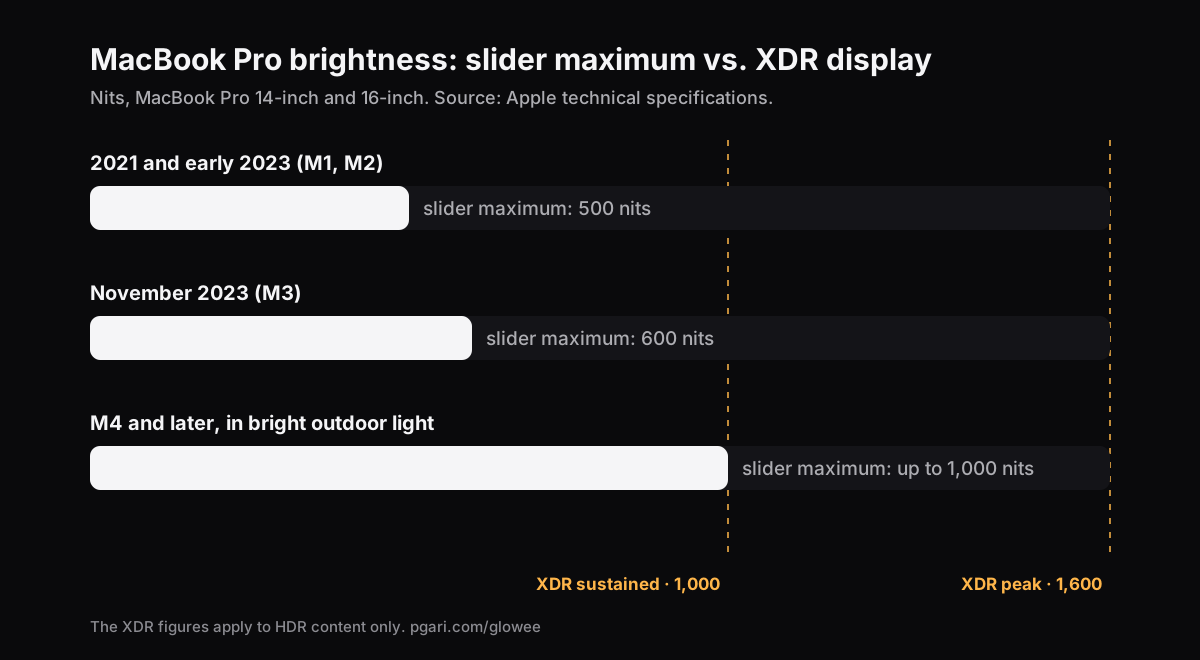
Read the 2021 and early-2023 row as arithmetic and the slider at 100 per cent hands over half of the sustained figure and less than a third of the peak; on the November 2023 machines those fractions become three-fifths and a little over a third. The same laptop can therefore look magnificent on an HDR trailer and thoroughly washed out in a spreadsheet at two in the afternoon with the balcony door open. Apple does quote up to 1,000 nits of ordinary content on the M4 and later machines, but tags the figure as an outdoor one.
Anyone who works beside a window, out on a balcony, in a café, or at whichever desk in the coworking space happens to be nearest the glass, already knows the problem this table describes. The light is in the panel. The slider will not release it.
Getting a MacBook Pro brighter than its own slider allows
That reserved range is not sealed off: macOS publishes it to apps as extended dynamic range, EDR for short. An app that switches the display into HDR mode can then rescale what is being drawn — and there are two ways of doing that, with visibly different results.
Overlay. A bright layer is painted on top of everything. Crude but easy, and it bleaches the colour and collapses the contrast, because every pixel now reaches you through a sheet of white.
Panel. The picture is untouched and the display itself is asked for more output. PGari Glowee takes this route: the XDR panel is held in HDR mode while the display's gamma table is scaled linearly, lifting every shade by an identical proportion. Nothing is re-tone-mapped, no colour is shifted and no layer is added — which is what keeps a retouched photograph or a brand palette exactly as you graded it.
Three levels are on offer, each a fixed multiplier on the gamma table, bounded by whatever headroom the display can spare in that moment:
| Level | Gamma factor (slider maximum = 1.00) |
|---|---|
| Low | 1.20× |
| Medium | 1.38× |
| Max | 1.50× |
Switch it on from the sun in the menu bar, or with ⌃ ⌥ ⌘ G wherever you happen to be. The same chord switches it off again.
Send the light to one window, not to all of them
Raise the whole screen and you also raise the half of it you are ignoring. Boost Area is the setting that aims the light:
- Whole Screen — the display is lifted end to end.
- Active Window — the extra light goes only to the window you are typing in, and moves when you click a different one.
- Pinned — the light stays fixed on one window while you work elsewhere; anything you drag across it is not lit.
On a long PDF on a bright afternoon this is usually the version you want: the page in front of you draws on the panel's reserve and the rest of the desktop is left alone.
When macOS pulls the display back
Night Shift, True Tone and a trip to sleep are all capable of resetting the display's settings. Glowee sees the reset and puts your level back inside two seconds, and after sleep it re-attaches to your displays at whatever level you had left running.
Which Macs can go past the slider, and which cannot
The answer is decided by the panel in front of you, never by the software.
Has EDR headroom, so it can be lifted:
- MacBook Pro 14-inch and 16-inch from 2021 onwards, with Liquid Retina XDR
- Apple Pro Display XDR
- Any other EDR-capable external display — and every connected EDR display is raised together, so a Pro Display XDR standing beside the built-in screen comes up with it
Has no headroom, so it cannot: the MacBook Air, along with every Mac whose panel is not XDR. There the top of the slider genuinely is the brightest the screen goes, and no software can add photons that the backlight is not producing. Painting something pale over the picture only makes the picture pale. That limitation deserves saying plainly on this page, because in India the Air is by far the more common machine: if that is the laptop on your desk, the useful answers are the settings in the first section — and, where the real complaint is a crowded screen rather than a dark one, turning down the windows you are not using, which needs no XDR panel at all.
An ordinary monitor at a coworking desk is in the same position. Apple's shortcut list does allow Control plus the brightness keys to reach an external display's brightness where the display supports it, but all that does is drive the monitor's own control, which stops where the monitor stops.
The price of the extra light
Pushing a panel harder draws more power and produces more heat, in the same way that dragging the built-in slider upward does. Turn the boost off once you are back indoors — that is precisely why there is a chord for on and a chord for off. And on battery, bear in mind that macOS is already pulling in the opposite direction through Slightly dim the display on battery.
A last point, useful before a call: nothing of the brightness boost reaches a screenshot or a screen recording, so footage shot on a boosted panel looks entirely ordinary to whoever plays it back. Making an audience look at a particular place is a separate job, done by a separate feature — Spotlight turns down everything but your window, and that one does record.
What readers ask about MacBook Pro brightness
Can I make my MacBook screen even brighter?
If the machine is a MacBook Pro with a Liquid Retina XDR panel, yes: the slider halts at the SDR ceiling while the display keeps HDR headroom above it, and an app is allowed to open that headroom for ordinary content — Glowee by as much as 1.5 times. If the machine is a MacBook Air, no. There the top of the slider and the top of the display are the same thing.
How can I brighten my dim Mac screen?
Three culprits account for most cases. The ambient light sensor may be pulling the screen down to suit the room; a battery setting may be dimming it; or you may be judging it against HDR video, which macOS permits to run far brighter than any ordinary window on the identical panel — as much as 1,600 nits next to 500 or 600.
How bright is 1600 nits?
One nit is a single candela per square metre. Set against a document's white on a 2021 or early-2023 MacBook Pro with the slider at the top, where Apple's figure is 500 nits, 1,600 nits is a little more than three times as bright. That number belongs to HDR highlights rather than a screen filled with white — full-screen sustained output is specified at 1,000 nits.
Can you adjust the brightness in HDR mode?
You can. Nothing stops the brightness keys while HDR content plays, and the HDR highlights go on sitting above everything else on the display.
How do I stop my Mac screen from going dark?
Switch off Automatically adjust brightness under System Settings → Displays, then Slightly dim the display on battery under Additional Options in System Settings → Battery. A screen that only goes dark after a stretch of no typing is a different setting again: System Settings → Lock Screen, where both Turn display off on battery when inactive and Turn display off on power adapter when inactive hold a duration you can lengthen.
Does the brightness slider move but the screen stays dim?
Look at True Tone, Night Shift and the accessibility colour options before anything else. Apple records that inverted colours, a greyscale filter or increased contrast can each switch True Tone off, and every one of them alters how bright the display reads. Apple's other suggestion is simply to let the display warm up.
Will this shift my colours?
Not by the panel method. Scaling the gamma table linearly leaves tone mapping untouched, so hues sit exactly where they sat and the only variable that moves is light output.
Can I try it without paying?
Yes — seven days, every feature unlocked, no account and no card. After that it is a one-time purchase — one Mac, or three Macs on one key, with a 30-day refund. Paddle handles the payment, in your own currency.
Try it on your own screen
PGari Glowee is a single menu bar app under 2 MB, built for macOS 13 or later and universal across Apple silicon and Intel. No kernel extension is installed and no background helper is left running; quit the app and the display goes straight back to normal.
More Glowee guides
- An ADHD focus app for Mac? This one only dims the screen
- Dim inactive windows on a Mac: the two apps that actually do it
- Focus on a window on a Mac when the other windows have to stay open
- Highlight the active window on a Mac, and leave the pointer alone
- Screen record on a Mac so your viewers know which window to watch
Sources
- support.apple.com/en-in/111902
- support.apple.com/en-in/111340
- support.apple.com/en-in/117735
- support.apple.com/en-in/121552
- support.apple.com/en-in/guide/mac-help/mchlp2704/mac
- support.apple.com/en-in/guide/mac-help/mchlfc3b7879/mac
- support.apple.com/en-in/guide/mac-help/mh11784/mac
- support.apple.com/en-in/102147
- support.apple.com/en-in/102650