 PGari Glowee: Mac brightness with window spotlight
MacBook Pro brightness: the light your panel keeps in reserve
Short answer: MacBook Pro brightness has two ceilings and the slider only shows you the lower one. On Apple's Irish specification pages, SDR brightness — the figure that governs documents, spreadsheets, browsers and everything else that is not HDR video — is 500 nits on the 2021 and early-2023 machines, 600 nits on the November 2023 models and up to 1,000 nits outdoors on the M4 and M5 models. The same Liquid Retina XDR panel is rated at 1,000 nits sustained across a full screen and 1,600 nits at peak. So when the slider will not move any further, a good deal of the panel is still held back for HDR content. An app can borrow some of it for ordinary windows: PGari Glowee scales the display's gamma by up to 1.5×, either across the whole screen or inside the single window you are working in.
Work through this page in order. The settings come first, because they are free and they are the cause more often than the hardware is.
Five macOS settings that keep a screen darker than it needs to be
Each of these is documented by Apple, and any one of them can be the whole of the problem.
- The brightness keys, in smaller steps. F1 and F2 move in fixed jumps. Apple's shortcut list gives you a finer control: Option-Shift-Brightness Up and Option-Shift-Brightness Down "adjust the display brightness in smaller steps," and adding the Control key applies the change to an external display, where the display supports it.
- Automatic brightness. System Settings → Displays holds Automatically adjust brightness, which appears only on a Mac with an ambient light sensor. It is worth knowing Apple's own caveat before you switch it off: doing so "may affect battery life, energy consumption, and long-term display performance."
- The battery rule. System Settings → Battery lists Slightly dim the display on battery under Additional Options, described by Apple as a way to "conserve energy by dimming the display when your Mac is not plugged in." Unplug the machine and the screen steps down without telling you.
- Night Shift. Apple's description is plain: Night Shift "automatically shifts the colours of your display to the warmer end of the colour spectrum when it gets dark," and it works out when that is from your Mac's clock and geolocation rather than from a fixed hour. Because it follows sunset, it arrives far earlier in a December working day than in a June one.
- True Tone. Apple says it "uses advanced multichannel sensors to adjust the colour and intensity of your display and Touch Bar to match the ambient light." Note intensity: True Tone is not only a colour feature. Turn it off for a minute and compare.
If you have been through all five and the screen is still not enough, you have found the ceiling macOS sets, not the ceiling of the display.
Why maximum MacBook Pro brightness is a software ceiling
An XDR panel is built to show HDR video, and HDR only means anything if highlights can be several times brighter than the white of a page. Keeping that difference available means capping ordinary content — SDR, in Apple's terminology — well below what the panel can emit. The gap is not small.
| MacBook Pro model | SDR with the slider at maximum | XDR sustained, full screen | XDR at peak |
|---|---|---|---|
| 14″ (2021) | 500 nits | 1,000 nits | 1,600 nits |
| 14″ (2023, M2 generation) | 500 nits | 1,000 nits | 1,600 nits |
| 14″ and 16″ (M3, November 2023) | 600 nits | 1,000 nits | 1,600 nits |
| 14″ (M4, 2024) | up to 1,000 nits (outdoors) | 1,000 nits | 1,600 nits |
| 14″ (M5) | up to 1,000 nits (outdoors) | 1,000 nits | 1,600 nits |
Figures from Apple's Irish technical specification pages for each model. The XDR column applies to HDR content.
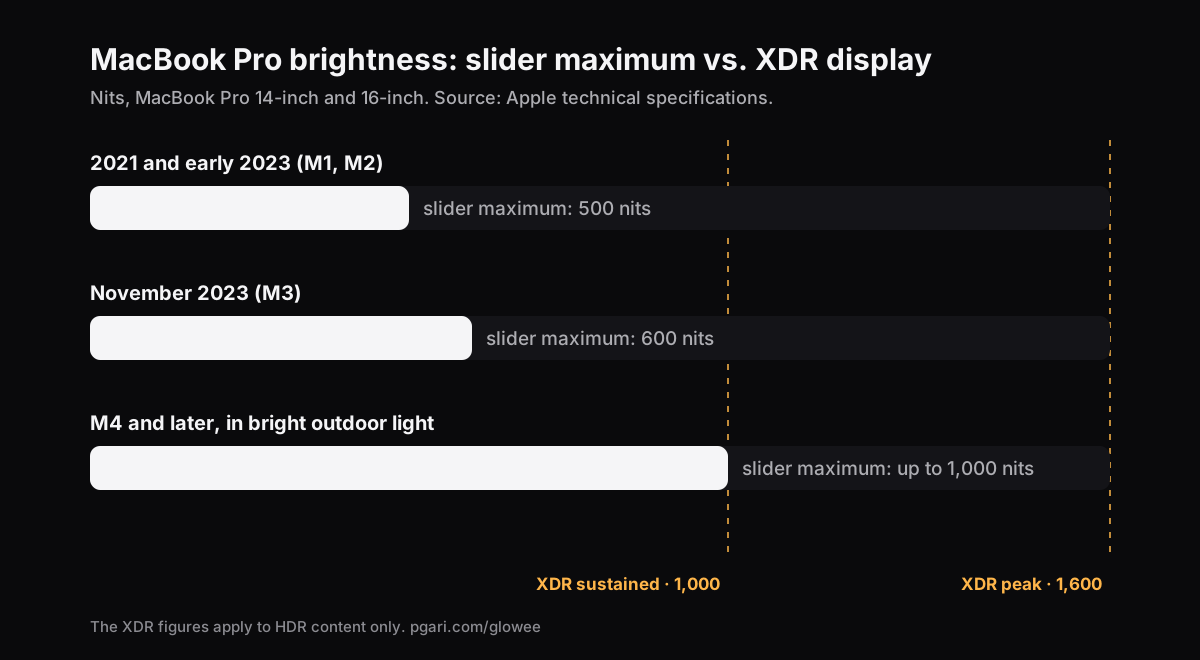
Put in proportion: on a 2021 or early-2023 machine, a full slider gives you half of what the panel sustains and under a third of its peak. On the November 2023 models it is three fifths and a little over a third. That is the reason a film looks spectacular and a bank statement looks flat on the same screen within the same minute. On the M4 and M5 models Apple does specify up to 1,000 nits for ordinary content, but qualifies it as an outdoor figure.
Two ways to add light, and only one of them keeps your colours
macOS exposes the spare range to apps as extended dynamic range, EDR. There are two approaches, and they produce different pictures.
Drawing a bright layer on top. Simple to build, and you end up reading through a sheet of white. Contrast collapses and colours go pale.
Asking the panel for more light. This is what PGari Glowee does. It puts the XDR panel into HDR mode and then scales the gamma table linearly, which lifts every shade by the same proportion. In the words of its own page, there is "no tone-mapping change, no color shift, no white layer." A photograph edited at Max looks like the same photograph, only brighter.
| Level | Gamma factor, with the slider maximum as 1.00 |
|---|---|
| Low | 1.20× |
| Medium | 1.38× |
| Max | 1.50× |
The factor applies within whatever headroom the display has at that moment. Switch the whole thing on or off with ⌃ ⌥ ⌘ G without leaving the app you are in.
Light only the window in front of you
Raising the whole screen raises everything, the half you are ignoring included. Boost Area decides where the extra light goes:
- Whole Screen — the entire display rises together.
- Active Window — only the window you are in. Move to another window and the light moves with you.
- Pinned — the light stays on one window while you work around it.
Reading a contract on a train with the sun coming through the window, Active Window is usually the better of the three: the page gets the panel's reserve and nothing else on the screen changes.
When Night Shift or sleep resets the display
Night Shift, True Tone and sleep can all reset display settings underneath an app. Glowee watches for that and restores your level within two seconds, and after sleep it re-attaches to your displays at the level you left.
Which Macs have headroom, and which have none
This is settled by the panel, not by the app.
Can be boosted:
- MacBook Pro 14″ and 16″ from 2021 onwards, with Liquid Retina XDR
- Apple Pro Display XDR
- Other EDR-capable external displays — all connected EDR displays are lifted together, so a Pro Display XDR rises alongside the built-in panel
Cannot be boosted: the MacBook Air and any other Mac whose display has no XDR panel. Their slider maximum is the most light the screen will make, and nothing installed on the machine changes that. If your real complaint is a crowded screen rather than a dim one, the answer on those Macs is turning down the windows you are not using, which needs no special panel at all.
The cost of running the panel harder
Running a display brighter uses more power and generates more heat, in exactly the way raising the built-in slider does. That is the argument for a shortcut rather than a permanent setting: one chord when you step out into the sun, one chord when you come back in.
One more thing worth knowing before you record anything. The brightness boost is left out of captures, so a screen recording made on a boosted display looks entirely ordinary to whoever watches it. If the point is to show an audience where to look, that is a different feature: Spotlight turns down everything around your window, and it is captured.
Recurring questions about MacBook Pro brightness
Can I push the screen past the default limit?
On a MacBook Pro with a Liquid Retina XDR panel, yes. The slider stops at the SDR figure and the HDR headroom above it can be opened for ordinary content; Glowee goes up to 1.5×. On a MacBook Air there is nothing above the slider to open.
Why does my Mac look dark even at full brightness?
Usually automatic brightness reading a dim room, or the battery setting dimming an unplugged machine, or a comparison with HDR video, which macOS allows to run at up to 1,600 nits against the 500 or 600 an ordinary window gets.
How bright is 1,600 nits in practice?
One nit is a candela per square metre. Against the 500 nits Apple specifies for SDR on a 2021 or early-2023 MacBook Pro, 1,600 is a little over three times as much light — and Apple gives that figure for HDR highlights, not for a full white screen, where the sustained specification is 1,000 nits.
I want the screen brighter outdoors rather than indoors. Does that change anything?
Only in which Mac you have. On the M4 and M5 models Apple already specifies up to 1,000 nits for ordinary content outdoors. On the earlier models the SDR figure is the same in a garden as in a room, which is where the extra 1.20× to 1.50× does the most obvious work.
How do I stop the screen dimming by itself?
Switch off Automatically adjust brightness in System Settings → Displays and Slightly dim the display on battery in System Settings → Battery, under Additional Options.
Am I using a built-in screen or an external monitor?
Both can be lifted if both are EDR-capable, and they are lifted at the same time. An ordinary external monitor cannot be, whatever Mac it is plugged into.
Does any of this alter the colours?
No, not when the light comes from the panel itself. The gamma table is scaled linearly and tone mapping is left alone, so what changes is light output and nothing else.
Can I try it before paying anything?
Glowee runs free for 7 days with every feature unlocked and no account. After that, a one-off purchase — one Mac, or three Macs on one key — with a 30-day refund.
See it on your own display
PGari Glowee is a single menu bar app, under 2 MB, for macOS 13 or later on Apple silicon and Intel. No kernel extensions, no background helpers; quit it and the display goes back to exactly where it was.
More Glowee guides
- An ADHD focus app that does one job, and that job is the screen
- Dim inactive windows on a Mac without moving a single one of them
- Focus on a window on a Mac without touching Focus mode
- Highlight the active window on a Mac when macOS only puts a name in bold
- Screen record on a Mac and leave no doubt about which window matters
Sources
- support.apple.com/en-ie/111902
- support.apple.com/en-ie/111340
- support.apple.com/en-ie/117735
- support.apple.com/en-ie/117737
- support.apple.com/en-ie/121552
- support.apple.com/en-ie/125405
- support.apple.com/en-ie/guide/mac-help/mchlp2704/mac
- support.apple.com/en-ie/guide/mac-help/mchlfc3b7879/mac
- support.apple.com/en-ie/102650
- support.apple.com/en-ie/102147
- support.apple.com/en-ie/102191